Log a set without unlocking.
Your last session is already filled in. Tap Done on the Lock Screen, say “80 for 8”, or tap once in the app: the set is logged, the rest timer starts, and the next set is waiting. A planned workout takes about five taps.
Strength Training App: Log Sets from the Lock Screen, done properly.
Log from the Lock Screen
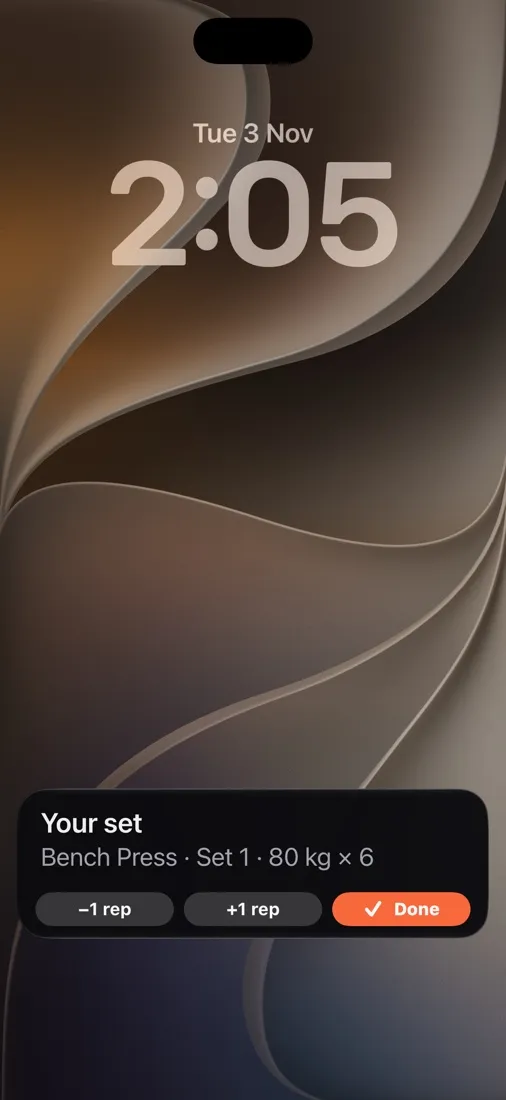
The next set and the rest countdown sit on your Lock Screen with −1 rep, +1 rep and Done. Tap Done without unlocking; Android shows the same buttons in a notification.
Say it instead
Tap the mic (or turn on hands-free) and say “80 for 8”, “done”, “one more rep” or “finish exercise”. Sets & Splits answers out loud and calls out your next set when rest is over.
No plate maths
For barbell lifts, the next set shows exactly what goes on each side of the bar.
One tap per exercise
Up next shows the next set with −/+ for weight and reps and a big Done. “Log all” logs a whole exercise as planned, and Finish can log the rest as planned.
Pre-filled from last time
Weights and reps from your previous session are ready to confirm or nudge up, and the rest timer starts by itself.
Records and stalls
Finishing a workout highlights new personal records. Lifts that haven’t moved in weeks are flagged in your weekly review.
Progress on every lift
In the web app, each exercise has charts of your estimated one-rep max, top set and volume, a plain-language trend and a suggestion for next session. Weekly sets per muscle show whether you’re doing enough.
Plans from your coach
If a coach programs for you, today’s session is waiting on the Today screen, exercise by exercise.
Three steps.
- Step 1
Start today’s session
Open Today and tap Start workout. Your coach’s plan or your own template loads with every exercise.
- Step 2
Log as you go
Tap Done in the Up next bar, on the Lock Screen, or say “done”. Rest starts counting at once and the next set takes its place.
- Step 3
Finish and review
See volume, duration and any new records. History, charts and estimated maxes update immediately.
Strength training FAQ
Can I use Sets & Splits for strength training without a coach?
Yes. Choose a program or build your own sessions, and Sets & Splits tracks every set, rest period and personal record for you.
Can I log sets without unlocking my phone?
Yes. On iPhone (iOS 17 or newer) the Lock Screen shows the next set and the rest countdown with −1 rep, +1 rep and Done buttons. On Android the same buttons are on a notification.
Can I log a workout by voice?
Yes. Tap the microphone and say things like “80 for 8”, “8 reps”, “done” or “one more rep”, or turn on hands-free mode and keep the phone in your pocket.
Will I lose sets if the gym has no signal?
No. Sets are saved on the phone first and sync once you are back online.
More of Sets & Splits
Start your first split.
Sets & Splits is coming to iPhone and Android, with the web app alongside. Join the waitlist and be first in.